Quick capture to your markdown files. From anywhere.

Burst Notes is a small utility that sits quietly in the background until you need it. Hit a keyboard shortcut, jot down a thought, and it's saved to your markdown file, all without leaving what you're working on.

B from any app
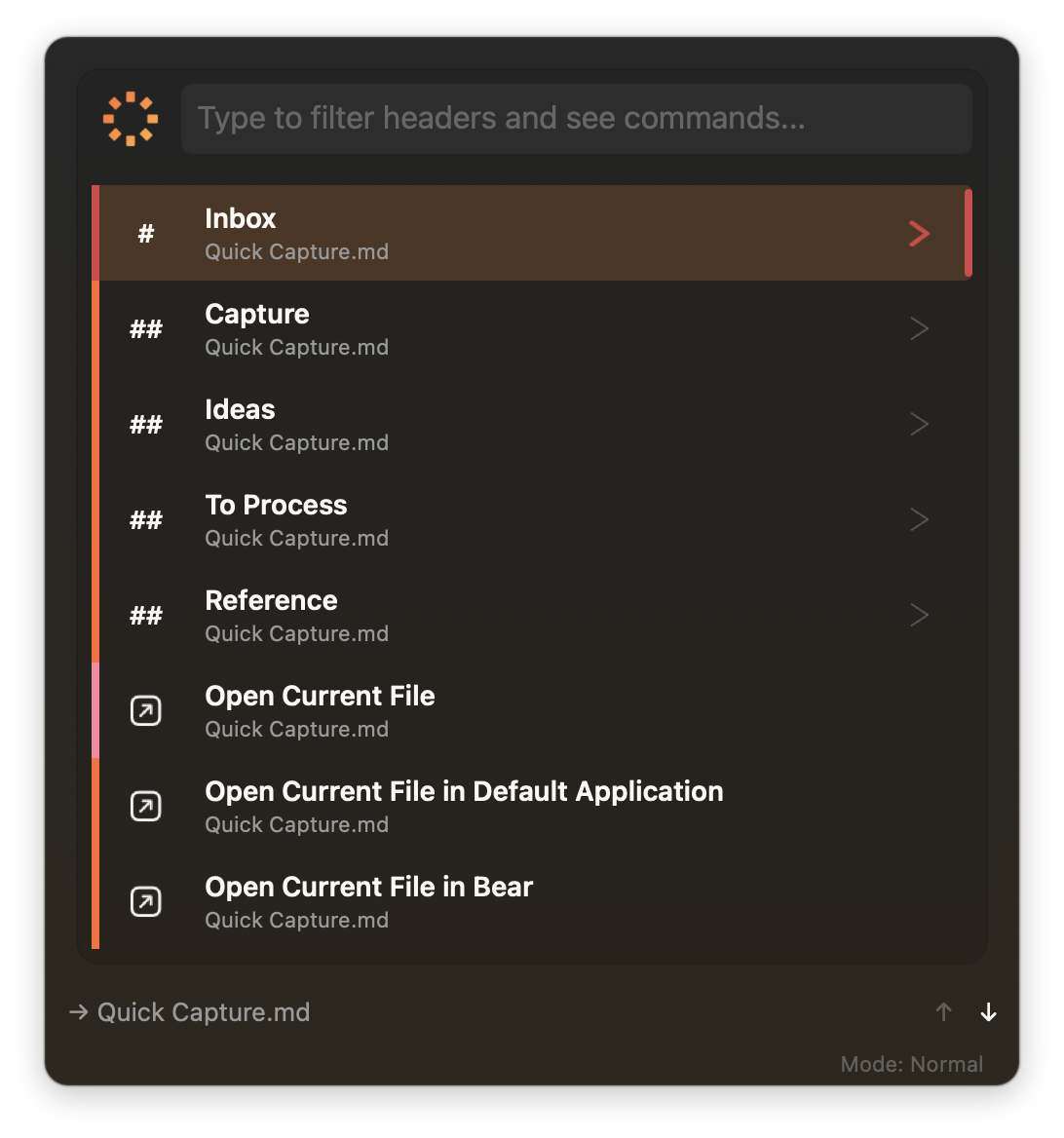
Burst Notes command window showing searchable header navigation

Capture in under ten seconds

The whole point of Burst Notes is to get out of your way. You're in the middle of something (coding, writing, reading) and a thought pops up that needs to go somewhere. You don't want to switch apps, find the right file, scroll to the right section, and then try to remember what you wanted to write.

Instead, you hit B. A small window appears. You type a few characters to find the right section in your document (Burst Notes shows you the header hierarchy), press Return, type your note, press Return again. Done. The window vanishes and you're back where you were.

1

Summon from anywhere

The global shortcut works no matter which app is in front. Burst Notes appears instantly, ready for input.

2

Navigate by header

Your markdown file's structure becomes your navigation. Type to filter, arrow keys to select. Your document outline is always just a few keystrokes away.

3

Capture and continue

Type your note (a bullet, a todo, a quick thought) and press Return. It's saved to the right place in your file, with the time stamped in front if you want it, and an editor opens if you want to expand on it. Or press Escape to dismiss and get back to work.

A simple tool that does one thing well

Plain markdown files

No database, no proprietary format. Standard .md files you can edit anywhere, sync however you like, and back up with any tool.

Keyboard-first design

Every operation from the keyboard: summon, search, navigate, insert, dismiss. The mouse is optional.

Gets faster over time

Learns which headers you use most. Frequent sections rise to the top, so your workflow speeds up automatically.

Always available, never in the way

No dock icon, no visible windows. Appears when called, vanishes when done. Near-zero resource use while idle.

Built native for macOS

Swift and AppKit, not Electron. Launches instantly, responds immediately, feels like part of your Mac. Universal binary.

Todo support

GitHub-flavored checkboxes built in. Insert tasks from capture, click to toggle in Visual mode, or use T.

Privacy by default

No telemetry, no analytics, no network required. Your notes never leave your machine. Sandboxed with minimal permissions.

Journal and log with timestamps

Press ⌃T and every captured line starts with the time of day. Type {{DATE}}, {{TIME}} or {{CLIPBOARD}} and it fills itself in. How it works

Dual-mode markdown editor

Visual polish or raw control: switch instantly

Visual mode

Hides the markdown markers as you type. Headings are large, lists continue by themselves, checkboxes are clickable. Switch with 1

Source mode

The raw text in a monospaced font, exactly as it is stored on disk. Nothing hidden, nothing changed. Switch with P). Switch with 2

Unified toolbar in both modes for headings, quotes, code blocks, lists, formatting and the date and time. Floating window stays on top. Smart cursor positioning. Adjustable text size. Auto-save on close. Light and dark themes.

People who already work in markdown

Burst Notes isn't trying to replace your note-taking system. It's a capture layer: a fast path from "I need to write this down" to "it's saved in the right place." It's designed for people who already have markdown files they're working with and just want a quicker way to add to them.

Developers

Your notes are just files

Standard markdown that works with VS Code, Obsidian, your favorite editor, Git, and every backup tool you already use.

  • Version-controllable and diffable
  • No import/export dance
  • Sync however you already sync
Writers & Researchers

Capture before it escapes

Ideas don't wait. One keystroke from any app, a few characters to find the right section, type your thought, done.

  • Sub-10-second interactions
  • Navigate by document structure
  • Works alongside your editor
PKM Enthusiasts

The fast-capture layer

You've built a system. Burst Notes isn't here to replace it. It's the fastest path from thought to saved note.

  • Native checkbox syntax
  • No new workflow to learn
  • Feeds into what you've built
Journals & Work Logs

Keep a running log

One timestamped line between tasks clears your head and leaves a record of the day. See the guides to interstitial journaling and keeping a work log.

  • The time typed for you
  • Date and clipboard placeholders
  • Daily Journal and Work Log templates

Pay once, keep it forever

$14.95
One-time purchase
  • 14-day free trial, fully functional
  • No feature limitations during trial
  • Free updates for the current major version
  • No account required
Download Free Trial

Requires macOS 15 Sequoia or later. Still on Ventura or Sonoma? Download version 1.07.

Under the hood

Editor
Visual + Source
Requires
Sequoia (15.0)+
Auto-save
On close
Framework
Swift / AppKit
Smart Ranking
Learns your usage
Privacy
No telemetry
File Format
Standard .md
Default Shortcut
⌘⇧B