Comprehensive Coverage
Market Leading Feature Set.
A Better Finder Rename's huge array of renaming options is organized into 15 intuitive
categories that cover all the text, character, position, conversion and truncation features that you
would expect from a great file renamer.
On top of this, A Better Finder Rename provides more advanced features that answer the prayers of many
professionals and hobbyists alike.
New to batch renaming? Start with our guide to
batch renaming files on a Mac.
Digital Photography
You're going to love this.
Digital Photographers in particular will appreciate the advanced sequence
number and date & time features, including custom date formats &
night mode for event photography.
A Better Finder Rename knows how to extract EXIF shooting date and time information from
your digital camera images and exploit them in creating sequence numbers or adding time and date
information to the file name.
Support for all major RAW formats (including JPEG, HEIC, HEIF, ARW, CRW, CR2, THM, NEF, TIFF, RAF, ORF ,
MRW, DNG, PEF, SRF, etc.) extends this to professional photographers.
A Better Finder Rename also deals gracefully with multiple shots captured in the same second and gives
access to camera and lens meta-data through its tag-based renaming
feature.
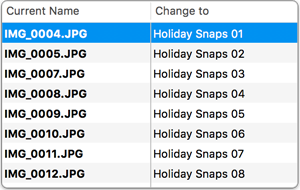
See it in practice:
renaming photos with sequence numbers so they sort
correctly.
Digital Music
Never miss a beat.
Music lovers will be delighted by our MP3/AAC renaming feature that allows you to exploit the ID3
meta-data embedded in most music files to create naming schemes of your own for your music
collection.
Meta-data information from MP3, AAC, FLAC, OGG, APE, M4V and iTunes music store files are supported.
Instant Preview & Change Highlighting
Eliminating guesswork & avoiding costly mistakes
Our instant preview feature displays all changes as you type, making it easy to dial in the right
settings and preventing you from making costly mistakes.
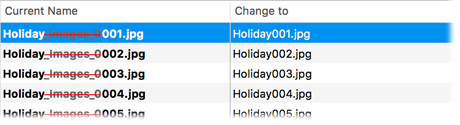
Version 12's change highlighting feature takes this to the next level by visually marking individual
changes.
Tag-Based Renaming
Pure meta-data savvy.
Today's media files come with an abundance of additional information that cannot be glanced from the
often meaningless file names themselves.
A Better Finder Rename allows you to leverage this meta-data to create more meaningful file names using
its tag-based renaming feature.
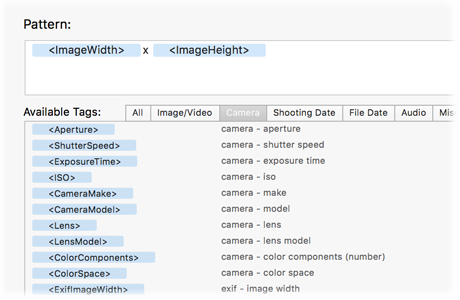
Our meta-data tag engine can read an extensive array of photo, image, music, movie, camera, lens and location meta-data,
and you can combine this information to implement any naming scheme you can imagine.
The latest version of the engine features much broader support for popular video and document
(via Spotlight meta-data) formats, time zone awareness & improved customizability.
Multi-Step Rename 
When one action is not enough.
We don't believe in making simple things unnecessarily complicated. That's why most users will find a
single action that does exactly what they want.
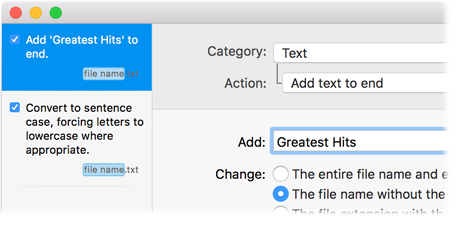
Sometimes, however, a single action simply isn't enough and that is where our multi-step renaming
features comes in. It lets you combine multiple simple actions to create a lean mean renaming
machine.
Our intuitive multi-step interface, in conjunction with our instant preview, makes it easy to keep track
of what's happening.
Filter Actions
Selective Renaming
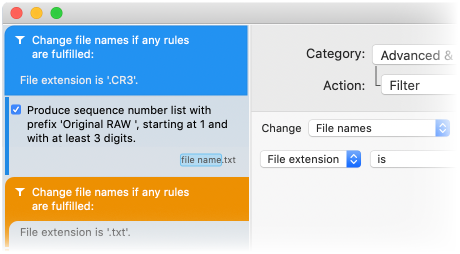
A Better Finder Rename allows you to add multiple file filters to your action list, so that different types of files can finally be renamed differently within a single multi-step rename.
You can preview both the file names and the filter criteria directly in the preview table.
Presets Sidebar
Create Your Own Arsenal of Go-To Actions
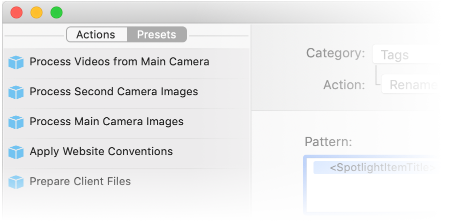
Presets allow you to save frequently used settings and organize them into your very own renaming library.
The Presets Sidebar allows you to create a new preset from the current settings with a single click. After
giving it a name, you can then restore those settings at any time with a mouse click.
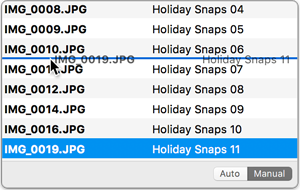
The sidebar allows you to re-arrange the order of the presets via drag & drop and to import and exports
presets for sharing or archiving.
File Content & Meta-Data Preview Pane
X-Ray Vision
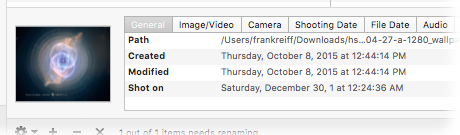
The Preview Pane allows you to peek inside your files and
delve into its meta-data, making it much easier to work with meta-data tags and providing additional
confidence in your settings.
File Pairing
Shooting Date Customization & Timezones
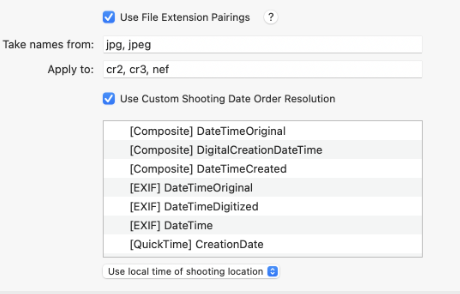
A Better Finder Rename 12 adds support for linking the names of files that share the same name, but have different file extensions. This
allows you to more easily deal with sidecar files, link thumbnails, RAW photos & videos, etc.
It is now also possible to customize which meta-data field is used as the shooting date for a file and so more gracefully deal with
incorrect, or unintuitive timestamps.
Finally, version 12 also fully supports timezones embedded into the timestamps and allows you to rename files based on either the local
time at the location that your photos were taken, or translate them to your own local timezone.
Automation via Droplets & Presets
Getting on top of repetitive tasks
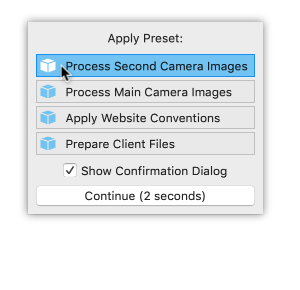
Version 12 of A Better Finder Rename offers two mechanisms for automatically applying frequently used
rename settings to files via simple drag & drop.
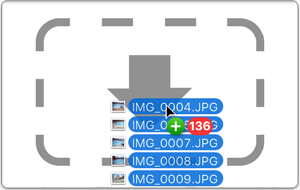
If you have previously saved your settings into a preset, you can rename files by simply dragging them
onto the closed application icon. A popup dialog will allow you to choose the preset to be applied.
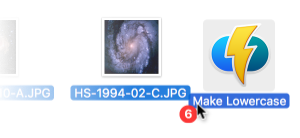
Alternatively, you can store the settings into droplet mini-applications and perform a rename by dragging
the files directly onto the droplet's icon.
Power Users
As simple as possible, as complex as necessary.
System administrators, web masters and other power users will appreciate the presence of advanced
features, such as regular expression support, conversion to Windows
NTFS/SMB compatible names, the ability to import file names from a database, a spreadsheet
or any other source that can produce plain or tab-delimited text files & customizable timestamp extraction. Finally, it allows you to save a
record of the current and new file names to facilitate tracking your files.
Step by step:
renaming files from a spreadsheet or CSV on a
Mac.
Beautiful Inside & Out
We sweat the details, so you don't have to
A Better Finder Rename takes file renaming to a new level of sophistication by introducing an advanced
64-bit multi-threaded renaming engine that solves many problems that other file renamers simply leave
unaddressed.
The database-backed renaming engine automatically resolves file name conflicts (when several files would
share the same name) using a range of configurable parameters. The sequence in which files are renamed
is optimized to avoid deadlocks which could occur when the order in which the files are renamed becomes
significant.
Download the Free Trial
Don't just take our word for it.